Mixfox: a volume mixer for your Mac, with a slider for every app
Mixfox sits in the menu bar and lets you control the volume of individual apps. Turn the call down and keep the video loud, or mute one app without touching the rest. Free, open source, and without an audio driver.
Version 0.1.0 for macOS 14.2 or later, Apple silicon and Intel. Signed with a Developer ID and notarized by Apple.
$ brew install --cask enricofranke/tap/mixfox
STATUS: FIRST RELEASE (v0.1.0) · MACOS 14.2+ · NOT AFFILIATED WITH APPLE
macOS has one volume for everything
01On a Mac every app shares one volume. If the call is too loud and the video next to it is too quiet, the volume keys change both. macOS has no built-in way to control the volume of individual apps.
Mixfox started exactly there: in a video call that was too loud, next to a video that was too quiet.
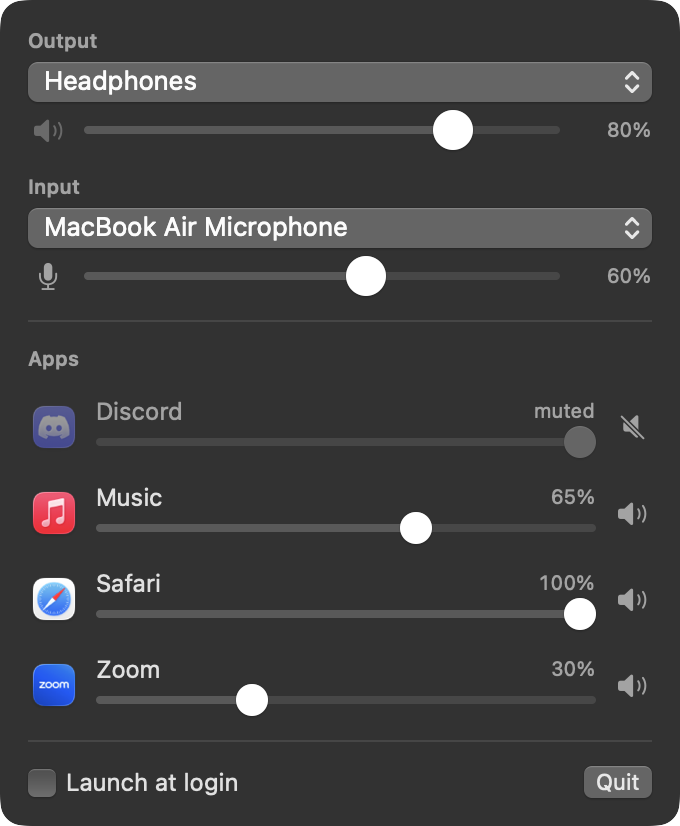
Mixfox adds the missing volume mixer to the menu bar. Every app that plays sound gets its own slider and a mute button, and the output and input device sit in the same menu.
It uses a part of macOS that exists since version 14.2, so nothing gets installed into your system: no audio driver, no virtual output device, no restart.
Per-app volume control from the menu bar
02A slider for every app
Every app that plays sound shows up with its own volume slider and a mute button. Apps at 100% are not touched at all.
Devices in the same menu
Switch the output and input device and set their volume without opening System Settings.
Remembers your levels
The volume you set for an app is saved and applied again the next time it plays.
No audio driver
No driver, no virtual audio device, no restart of the sound system. Your output device stays what it is.
Fails safe
If Mixfox quits or crashes, every app is back at its normal volume right away. No app stays silent.
Menu bar or window
Mixfox lives in the menu bar. Open it a second time and the same mixer appears as a small window, in case the icon hides behind the notch.
English and German
The app follows the language of your Mac.
Small and open
About 1,400 lines of Swift, no dependencies, MIT license. You can read all of it.
Install Mixfox
03- 01Download Mixfox.zip, unpack it and move Mixfox.app to your Applications folder. Or use the Homebrew command below.
- 02Start Mixfox. A slider icon appears in the menu bar.
- 03macOS asks whether Mixfox may record system audio. Allow it: this permission is what lets one app change the volume of another. Mixfox records and stores nothing.
- 04Open the menu and drag the slider of the app that is too loud.
$ brew install --cask enricofranke/tap/mixfox
$ git clone https://github.com/enricofranke/mixfox.git
$ cd mixfox
$ ./build.sh install
To remove it, quit Mixfox and move the app to the Trash, or run brew uninstall --cask mixfox. Nothing else was installed.
Turn one app down without lowering everything else
04- 01Start the call as usual. Zoom, or any other app that plays sound, appears in Mixfox with its own row.
- 02Open Mixfox from the menu bar and drag that app's slider down.
- 03Leave the Mac's own volume where it is. Music, videos and every other app keep playing at the same level.
- 04The next time the app plays sound, Mixfox applies the volume you set again.
The classic case is a video call: you want the call quieter, but the music or the video should stay as it is. Mixfox was built and first used during a Zoom call.
It works the same way for any app that plays sound through macOS: call apps, browsers, music players, games.
A browser counts as one app, so all of its tabs share one slider.
How it works: Core Audio process taps, no audio driver
05- 01For every app you turn down, Mixfox creates a tap on that app's audio. The tap mutes the app's own output, but only while Mixfox is reading it.
- 02It builds a private device out of the app's output device plus that tap. Nothing shows up in your list of sound devices.
- 03On the audio thread it copies the tapped sound to the output device, multiplied by the level from the slider.
Older volume mixers for the Mac install a virtual audio device and route all sound through it. Process taps, which Apple added in macOS 14.2, make that unnecessary.
Helper processes, such as a browser's audio service, count towards the app that owns them. Two minutes after an app goes quiet its tap is removed again, so the Mac can still go to sleep on its own.
The source code is on GitHub.
Good to know
06| RECORDING INDICATOR | While an app is turned down, macOS shows its audio recording indicator. That is the tap. Mixfox stores nothing. |
|---|---|
| DELAY | An app you turned down plays about one audio buffer later than it otherwise would. |
| NO BOOST | The sliders only turn apps down. There is no boost above 100%. |
| AFTER SILENCE | When a turned-down app starts playing after more than two minutes of silence, a brief moment can come through at full volume before the tap is back. |
| INTEL MACS | The download contains an Intel build, but Mixfox has only been tested on Apple silicon. |
| MAC APP STORE | Mixfox uses two private macOS calls, one to check the audio permission and one to find the app a helper process belongs to. That rules out the App Store. |
Frequently asked questions
07Does macOS have a built-in volume mixer?
No. On a Mac all apps share one output volume, and there is no built-in control for the volume of individual apps. You need an extra app such as Mixfox for that.
How do I lower Zoom's volume without lowering everything else on my Mac?
Start Mixfox, open it from the menu bar and drag the slider in the Zoom row down. The Mac's own volume stays where it is, so music, videos and other apps keep playing at the same level. The same works for any other app that plays sound.
Is Mixfox free?
Yes. Mixfox is open source under the MIT license. There is no account, no subscription and no paid version.
Does Mixfox record my audio?
No. macOS asks for the System Audio Recording permission because that is what allows one app to take over the sound of another. Mixfox passes the audio straight on to your output device at the volume you set. Nothing is recorded, stored or sent anywhere.
Does Mixfox install an audio driver?
No. Mixfox uses Core Audio process taps, which are part of macOS since version 14.2. It installs no driver and no virtual audio device, and your output device stays what it is. If Mixfox quits, every app is back at its normal volume.
Which macOS versions does Mixfox support?
macOS 14.2 or later. Mixfox is developed and tested on macOS 26 on Apple silicon. The download also contains an Intel build, which is untested.
Can Mixfox make an app louder than 100%?
No. The sliders only turn apps down. To make one app stand out, turn the others down and raise the Mac's volume.
How do I uninstall Mixfox?
Quit Mixfox and move Mixfox.app to the Trash. With Homebrew, run brew uninstall --cask mixfox. Nothing else was installed.
Made by Enrico Franke
I'm a founder from the Lake Constance region and I build software products. When a tool I need doesn't exist the way I want it, I build it and put it online. Mixfox is one of those. Contributions are welcome; for larger changes please open an issue first.
Mixfox is not affiliated with Apple, Zoom or the makers of any app shown on this page. App names and icons belong to their owners. MIT license.